Disk Image Formats Explained: ISO vs DMG vs IMG vs BIN/CUE
TL;DR: Use ISO for maximum compatibility. Use DMG only for macOS. Use BIN/CUE for old audio CDs. Use IMG for raw USB backups.
Capability Comparison
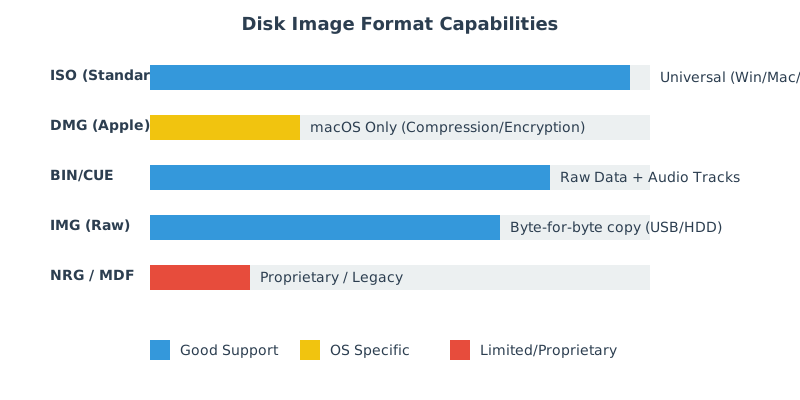
Disk image formats fall into two broad categories:
- File system images: “Optical-disc style” images that model ISO 9660/UDF structures (commonly
.iso). - Raw block images: Sector-by-sector snapshots of a disk or partition (commonly
.img), often without a header.
When choosing a format, match it to your target: distribution vs backup, optical vs USB, and the operating systems that must read it.
| Format | Best for | Native support | Notable features |
|---|---|---|---|
| ISO | Software distribution, bootable installers, archiving optical media | Windows/macOS/Linux | ISO 9660/UDF; widely compatible |
| DMG | macOS app distribution, Mac-specific workflows | macOS | Compression, encryption, read/write variants |
| IMG | Cloning SD/USB drives, embedded images | Linux/macOS (Windows via tools) | Raw sectors, includes partition tables if created from whole disk |
| BIN/CUE | Preserving multi-track CDs (especially audio) | Tool-dependent | Track layout described by .cue |
ISO (International Organization for Standardization)
The .iso format is the industry standard for optical media. It supports ISO 9660 and UDF file systems. It is uncompressed and supported natively by Windows, Linux, and macOS. It is the best format for software distribution.
Common scenarios where ISO is the right answer:
- Bootable installers: Operating system installation media (BIOS/UEFI).
- Cross-platform sharing: A single image that all major OSes can mount.
- Long-term archiving: Vendor-neutral, documented ecosystem.
DMG (Apple Disk Image)
The .dmg format is exclusive to macOS. It supports compression, encryption, and read/write capability. Windows cannot read DMGs without third-party tools like VIO ISO Editor (which can convert DMG to ISO).
DMG is a container rather than “an ISO variant”. In addition to read-only images, DMG can represent read/write images and sparse images that grow on demand. This flexibility is useful for macOS packaging but can be a portability barrier.
IMG (Raw Sector Copy)
The .img format is often a "raw" copy of a disk, sector-by-sector. It is commonly used for Raspberry Pi SD card backups or USB drive clones. It has no metadata header—it's just the data.
What an IMG contains depends on what was captured:
- Whole-disk image: Includes partition table (MBR/GPT) and all partitions.
- Single-partition image: Starts at the partition’s first sector and contains only that filesystem.
Because IMG is raw, you typically “write” it to a disk (like a USB) rather than “open” it as a file archive.
BIN/CUE, NRG, MDF
These are legacy or proprietary formats:
- BIN/CUE: Used for CDs with multiple tracks (like Audio CDs with data). The CUE file describes the tracks, the BIN holds the data.
- NRG (Nero) / MDF (Alcohol 120%): Proprietary formats from specific burning software. Best converted to ISO for long-term preservation.
For virtualization workflows you may also encounter formats such as .vhd, .vhdx, and .vmdk. These are designed for virtual disks (read/write, snapshots) rather than optical media distribution.
Conversion & interoperability
A conversion only preserves what the source format actually contains. For example, converting a multi-track audio CD image to a single ISO may lose track boundaries and audio metadata.
Typical conversion goals:
- DMG → ISO: For sharing a Mac-origin image with Windows/Linux users.
- NRG/MDF → ISO: For long-term preservation and compatibility.
- BIN/CUE → ISO: Only appropriate for data tracks; audio-focused images usually need specialized handling.
For visual inspection and controlled conversion, VIO ISO Creator can help normalize images into a more portable format.
Common pitfalls
| Pitfall | Why it happens | What to do |
|---|---|---|
| “It’s an ISO” but it won’t mount | File extension doesn’t match content, or the download is incomplete | Verify checksum, re-download, confirm the format before converting |
| Audio CD images lose tracks after conversion | ISO 9660 models data filesystems, not multi-track audio layouts | Keep BIN/CUE for audio preservation; convert only when you know the target use |
| Large files don’t work on some “ISO-mode” USB writers | FAT32 limitations and UEFI quirks | Use DD mode for hybrid images or a workflow designed for your OS media |