UEFI Secure Boot and ISOs: Why Modified Images Fail
Problem: You edited a Windows ISO, saved it, and now it won't boot, showing "Security Violation".
Cause: You broke the digital signature.
The Chain of Trust
UEFI Secure Boot is a security standard that ensures a device boots using only software that is trusted by the Original Equipment Manufacturer (OEM).
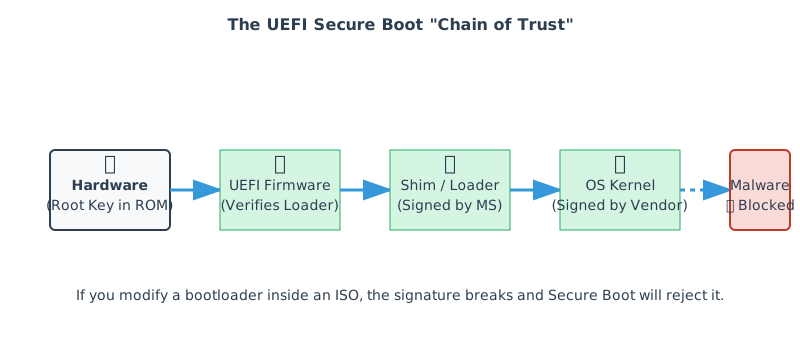
When an ISO boots, the computer's firmware checks the cryptographic signature of the bootloader file (usually \EFI\BOOT\BOOTx64.EFI). If the signature is valid (signed by Microsoft or a trusted key), it executes. If not, it halts.
The platform holds key databases (commonly referred to as PK/KEK/db/dbx) that define which signatures are trusted and which are explicitly revoked.
Why editing breaks signatures
If you use an ISO editor to modify the bootloader file itself, the signature becomes invalid immediately.
However, usually you are just modifying other files (like install.wim). Why does it still fail? Because modern bootloaders also check the integrity of the kernel and other components they load. If the chain extends to those files, and you changed them, the bootloader stops the process.
What Secure Boot actually verifies
Secure Boot is primarily about verifying EFI executables before they run. Common examples include:
\EFI\BOOT\BOOTx64.EFI(fallback bootloader)- Vendor boot managers (Windows boot manager, GRUB, Shim)
- Some kernels and kernel modules, depending on the OS and configuration
It does not automatically verify every file on the ISO. That said, many boot chains add additional integrity checks after the initial Secure Boot verification step. That is why changing “regular files” can sometimes still break a boot flow.
Safe vs unsafe ISO modifications
| Modification | Risk level | Why |
|---|---|---|
| Add extra files (docs, scripts, configs) without touching EFI binaries | Low–Medium | Usually doesn’t change signed binaries, but may affect downstream integrity checks |
| Edit bootloader config (GRUB menu, kernel parameters) | Medium | May be allowed, but the boot chain varies by distro/vendor |
Replace or patch .EFI executables |
High | Signatures break; firmware rejects or OS chain fails |
| Rebuild a custom boot chain | High | Requires key management, signing, and target firmware enrollment |
If your customization requires boot-chain changes, plan for signing and test on real hardware with Secure Boot enabled.
Solutions and Workarounds
- Disable Secure Boot: The easiest fix for personal use. Go into BIOS settings and turn off Secure Boot.
- Use a "Shim": Linux distros use a pre-signed "Shim" loader that allows loading unsigned kernels if the user manually approves a key (MOK Manager).
- Don't touch the bootloader: When using VIO ISO Editor, ensure you do not modify or replace the EFI boot files unless you know exactly what you are doing.
For enterprise workflows and repeatable builds, the long-term approach is to sign your boot components with your own key and enroll that key on target devices. This requires a controlled key lifecycle and a deployment policy.
Troubleshooting by symptom
| Symptom | What it usually indicates | Next step |
|---|---|---|
| UEFI shows “Security Violation” immediately | Firmware rejected an unsigned/modified EFI binary | Restore original EFI binaries or disable Secure Boot to confirm diagnosis |
| Boot menu loads, then fails later | Downstream integrity checks (kernel/modules) failed | Revert changes, or use a distro-approved customization mechanism |
| Works on one machine but not another | Different Secure Boot policies/keys or dbx revocations | Test on a representative device set; keep firmware updated and document key states |